Minecraft Font Generator

Write pixel lettering with Java color codes, bold and italic. Preview your words, then download a PNG or SVG, or copy the Java-formatted text.

Free local rendering · no account or credits · independent community font

ASCII text · 32 characters/line · 4 lines · 120 total. Codes excluded.

Java legacy formatting; support varies by destination.

Try an example

Your preview

Local rendering · no account or credits

Loading the community font and drawing your preview…

The checkerboard marks transparency and is not exported. The preview may shrink to fit; PNG downloads keep the original pixels, and SVG uses the same rendered letter shapes.

Java legacy preview · independent community font

Format support & font license

These controls follow Java legacy color and formatting codes. Bedrock interprets some codes differently. Obfuscated text (§k), RGB extensions and non-ASCII glyphs are not supported in this preview.

Java legacy formatting uses §. Ordinary ampersands stay visible. Whether a game field accepts § depends on that field.

PNG and SVG are images, not installable fonts. Copied codes carry text formatting only; pixel scale, spacing, alignment, default text color, shadow and background apply to the exported image.

This is an independent tool using a community font. It is not an official Minecraft product and is not affiliated with Mojang or Microsoft.

Community font: Minecraft by Idrees Hassan
Insert a color
Insert formatting

Click to insert a code at the cursor, or select text to wrap it with a code and reset. A color code clears earlier formatting; apply bold or italic after the color.

Image settings4× · Transparent background

Three examples you can recreate

These PNGs were exported with this tool. Load their exact settings, change the words and make your own version.

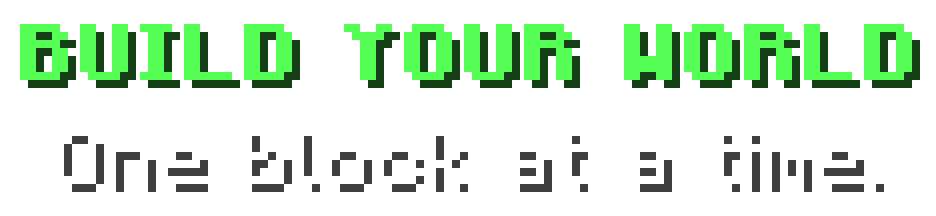
BUILD YOUR WORLD in bold green pixel letters above One block at a time. in white
Actual PNG export

A two-line server welcome

A bold green heading with a regular white second line. The white color code clears the earlier bold style.

Exact text & settings

Input text

§a§lBUILD YOUR WORLD
§fOne block at a time.
Syntax
Java legacy §
Image
4× pixels · transparent · shadow on
Layout
Centered · letter spacing 0 · line spacing 4

The transparent PNG is shown on a dark surface here. Only the text and its pixel shadow are exported.

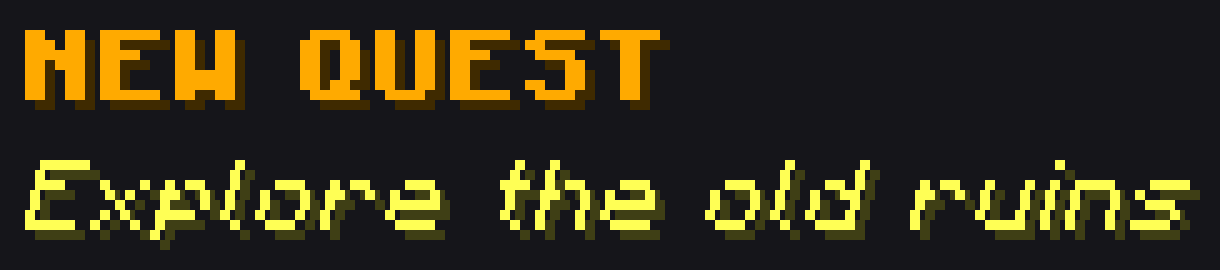
NEW QUEST in bold gold pixel letters above Explore the old ruins in italic yellow
Actual PNG export

A gold quest title

Use a bold gold title and a yellow italic subtitle against a solid dark background.

Exact text & settings

Input text

§6§lNEW QUEST
§e§oExplore the old ruins
Syntax
Java legacy §
Image
5× pixels · #15151a background · shadow on
Layout
Left aligned · letter spacing 0 · line spacing 4

The background, shadow and image scale are PNG/SVG settings. They are not included when you copy Java codes.

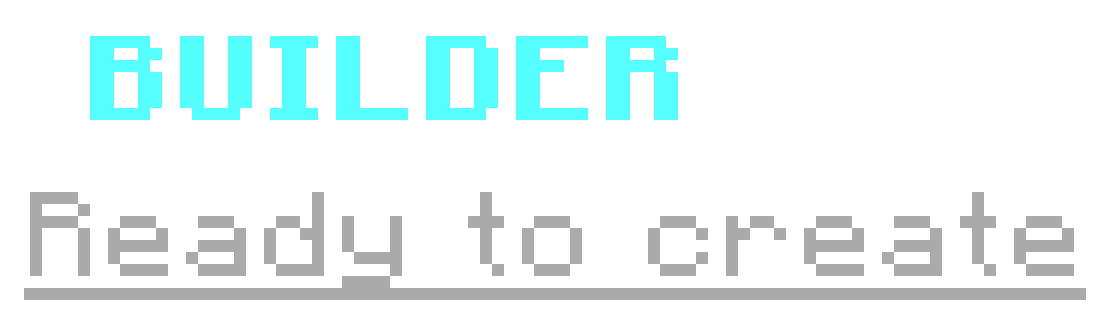
BUILDER in bold aqua next to Alex in white, with Ready to create underlined in gray below
Actual PNG export

A player tag with an underline

Try plugin-style & codes for an aqua role label, a white name and an underlined gray caption.

Exact text & settings

Input text

&b&lBUILDER &r&fAlex
&7&nReady to create
Syntax
Plugin format &
Image
6× pixels · transparent · shadow off
Layout
Centered · letter spacing 0 · line spacing 4

The & input mode needs a compatible formatter in its destination. Copy Java codes converts this example to § syntax.

Make the two-line server welcome

Use the first example to see how Java color codes and formatting combine before exporting an image.

  1. Enter the text in Java syntax

    Choose Java legacy · § codes and paste these two lines. The color code comes before the bold code.

    §a§lBUILD YOUR WORLD
    §fOne block at a time.
  2. Set the image treatment

    Open Image settings. Choose 4× pixel scale, letter spacing 0, line spacing 4 and Center alignment. Turn on Pixel shadow and Transparent background.

  3. Check the two text styles

    The first line should be green and bold. The §f code starts a white second line and clears the bold style. Check the exact spelling in the preview.

  4. Choose an export

    Download PNG for a ready-to-place image, or SVG for the same pixel shapes as vector rectangles. Copy Java codes if your destination accepts § formatting; check that field or plugin before pasting.

Java codes and image settings do different jobs

Color codes §0–§f select the 16 legacy colors. Add §l for bold, §o for italic, §n for underline or §m for strikethrough. A new color clears the earlier formatting; §r resets the styles and returns to the selected default image color.

Plugin format is an explicit & input mode. It needs a compatible plugin or formatter elsewhere. Use && for a literal ampersand in this preview; Copy Java codes converts formatting to § and restores ordinary ampersands. Bedrock handles some codes differently and is outside this preview’s scope.

Copied codes carry the words and formatting codes. Pixel scale, spacing, alignment, default image color, shadow and background stay with the PNG/SVG image settings.

A community font, rendered in your browser

The letter shapes come from Minecraft by Idrees Hassan, an independent community font distributed under the SIL Open Font License 1.1. This tool is not an official Minecraft product and is not affiliated with Mojang or Microsoft.

The preview supports printable ASCII: English letters, numbers, spaces and standard punctuation. Keep each line to 32 visible characters, with up to 4 lines and 120 visible characters in total. Formatting codes do not count. Obfuscated text (§k), RGB extensions, emoji and other scripts are not supported.

The font files load from this site; your text is rendered locally. PNG and SVG use the same pixel layout. SVG contains vector rectangles rather than editable text or an embedded font. Keep pixel artwork at its original size or enlarge it by a whole-number factor for crisp edges.

Minecraft font generator FAQ

Yes. Previewing text, downloading PNG or SVG and copying Java codes run locally without an account or credits. The browser first loads the community font from this site.

More ways to make text graphics

Pixel font generator

Make arcade-style lettering with Press Start 2P, pixel outlines and a PNG export.

Text to PNG

Choose another typeface and set a custom canvas, outline and transparent background.

Text images and font files explained

Compare a rendered image, an installable font and copy-and-paste text.